Looking for a simple internal linking strategy for beginners? You are in the right place. Internal links are one of the few SEO tasks that are completely in your control. They cost nothing, need no technical skills and can be done on the posts you have already published.
Many new bloggers spend weeks writing a great article and then leave it sitting alone, with no other page pointing to it. Google struggles to find that page, and readers never see it.
In this guide, you will learn what internal links are, why they matter and how to build your own plan in 7 easy steps. No jargon, just a process you can follow today.
What Is Internal Linking?
An internal link is a clickable link from one page on your website to another page on the same website. For example, when I point you to my guide on on-page SEO basics, that is an internal link.
An external link is different. It takes the reader to another website. Both are useful, but only internal links are fully under your control.
Internal links usually appear in these places:
- Contextual links: links inside the body of your article. These are the most valuable for SEO.
- Navigation links: links in your header menu.
- Footer links: links at the bottom of each page.
- Sidebar and related post links: links to other articles on your blog.
- Breadcrumbs: small links that show where a page sits on your site.
This guide focuses on contextual links, because that is where you make the biggest difference with the least effort.
Why an Internal Linking Strategy for Beginners Matters
Adding random links here and there is not a strategy. A plan makes sure your most important pages get the attention they deserve. Here is what good internal links do for your website.
1. They help Google find your pages
Google discovers new pages mainly by following links. If you want to understand this process better, read how search engines work. According to Google’s link best practices, every page you care about should have a link from at least one other page on your site.
2. They explain what your pages are about
The clickable words in a link are called anchor text. Google uses this text, along with the words around it, to understand the page you are linking to. Clear anchor text gives Google a clear signal.
3. They share authority across your site
When a page earns backlinks from other websites, it builds authority. Internal links help pass some of that value on to other pages. That is why linking from your strongest posts to your newer posts is so useful.
4. They keep readers on your site
A helpful link gives readers an obvious next step. Someone who came to learn one thing may stay to read three more articles, and that is how visitors become subscribers and customers.
Types of Pages in Your Internal Linking Plan
Before you add any links, understand the three kinds of pages involved. This is the foundation of a good internal linking strategy for beginners.
- Pillar pages: long, broad guides on a main topic, such as a complete SEO guide.
- Cluster posts: shorter articles that cover one specific subtopic, such as keyword research.
- Money pages: pages that earn you business, such as a service, course or contact page.
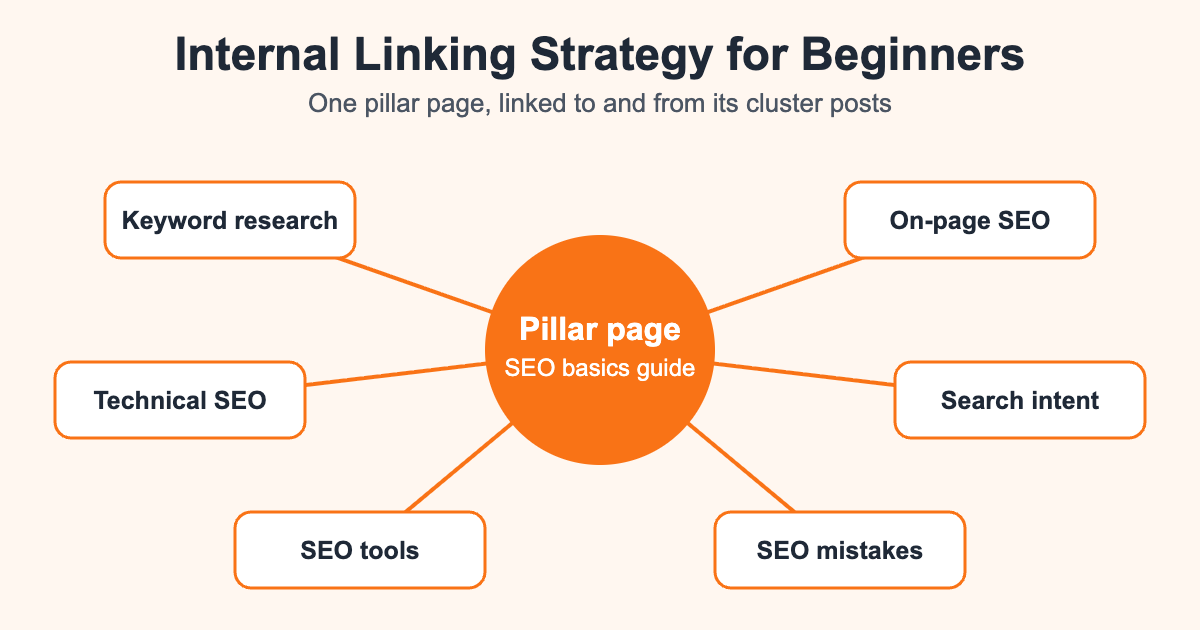
The simple rule is this: cluster posts link up to the pillar page, the pillar page links down to each cluster post, and related cluster posts link to each other. Your strongest pages can then send readers towards your money pages.
Internal Linking Strategy for Beginners: 7 Easy Steps
Now let’s build your plan. You can do all of this with a free spreadsheet and your WordPress dashboard.
Step 1: List all your published pages
Open a spreadsheet and add every post and page you want people to find. Create columns for the URL, main topic, target keyword and the number of internal links pointing to it.
If you have not chosen target keywords yet, start with this guide to keyword research for beginners. You need to know what each page should rank for before you can link to it properly.
Step 2: Group your pages into topics
Sort your pages into topic groups. A marketing blog might have groups for SEO, content marketing, paid ads and social media. Each group becomes one cluster.
If two posts target the same keyword, consider merging them. Competing pages can confuse both readers and search engines.
Step 3: Choose your most important pages
Pick one pillar page for each group, plus any money pages. These are the pages that should receive the most internal links. If everything is a priority, nothing is.
Step 4: Find your orphan pages
An orphan page has no internal links pointing to it. Readers cannot reach it through your site, and Google may struggle to find it too.
The Links report in Google Search Console shows how many internal links your pages receive. Compare it with your spreadsheet. Any page that is missing or has very few links goes to the top of your to-do list. You can explore more options in my list of SEO tools for beginners.
Step 5: Link cluster posts to the pillar page
Open each cluster post and add a natural link to its pillar page. Then open the pillar page and link out to every cluster post. This two-way connection shows Google that the pages belong together.
Next, add links between closely related cluster posts. A post on search intent, for example, connects naturally with a post on keyword research.
Step 6: Write clear anchor text
Anchor text should tell people what they will get after clicking. We will look at examples in the next section.
Step 7: Add new links every time you publish
This is the step most beginners forget. Whenever you publish a new post, do two things:
- Add links from the new post to older, relevant posts.
- Go back to 2 or 3 older posts and add links to the new post.
The second task is the important one. A new post starts with no links pointing to it, so older pages give it a helpful push. Make this part of your publishing checklist, and your internal linking strategy for beginners will keep working as your blog grows.
How to Write Good Anchor Text
Good anchor text is short, descriptive and natural. It should make sense even when read on its own.
- Weak: “To learn more, click here.”
- Weak: “Read this article.”
- Better: “Learn how to match content to search intent.”
- Better: “Follow this technical SEO checklist.”
Follow these simple rules:
- Avoid vague words such as “click here”, “read more” and “this post”.
- Use words that describe the destination page.
- Vary your wording instead of repeating one exact phrase every time.
- Keep it short. A few words are usually enough.
- Do not link a whole paragraph or stuff in keywords.
If you want to understand why the wording matters, my guide to search intent explains how to think about what readers actually want.
A Simple Internal Linking Example
Imagine you run a blog about SEO. Here is how one topic cluster could look.
- Pillar page: Your complete SEO guide for beginners.
- Cluster post 1: Keyword research, which links to the pillar page and to the on-page SEO post.
- Cluster post 2: On-page SEO, which links to the pillar page and to the content writing post.
- Cluster post 3: Technical SEO, which links to the pillar page and to the on-page SEO post.
- Money page: Your SEO service or course, linked from the pillar page where it genuinely fits.
A reader can now move through the topic in a logical order, and Google can see the relationship between every page. For a real example of a pillar page, take a look at my SEO foundations guide.
Common Internal Linking Mistakes to Avoid
Beginners often make the same few errors. Fixing them is usually quick.
- Adding too many links: Too many links make a page hard to read and dilute each one. Link only where it helps.
- Linking only from menus: Contextual links inside your content give readers and Google more information.
- Using the same anchor text everywhere: Natural variety reads better.
- Forgetting older posts: Your oldest content may have the most authority, so put it to work.
- Linking to broken or redirected pages: Update links whenever you change or delete a URL.
- Linking to unrelated pages: A link should make sense to the person reading it.
Broken links are a technical issue as well as a linking one. My guide to technical SEO for beginners shows you what else to check. You can also read about other mistakes that kill blog rankings.
How to Audit Your Internal Links
Set a reminder to review your internal links every few months. A simple audit only takes a short session.
- Open the Links report in Google Search Console and look at your internal links.
- Check whether your most important pages are near the top of the list.
- Find posts with few links and add 2 or 3 from related articles.
- Fix any broken links you find.
- Update older posts with links to anything you have published since.
To find linking opportunities quickly, search Google for site:yourdomain.com “your topic”. It shows pages on your site that mention that topic, and each one is a possible place to add a link. This works especially well alongside evergreen content, because those posts stay useful for years and keep passing value along.
Your Internal Linking Checklist
Save this short list and run through it before you publish any article.
- Does this post link to its pillar page?
- Does it link to 2 or more related posts?
- Have I added links from older posts to this new post?
- Does each anchor text describe the destination page?
- Do all the links work?
- Does every link genuinely help the reader?
Want an expert to fix your site structure?
Internal linking, site structure and on-page fixes are part of my small business SEO services. I can audit your website and build a linking plan for you.
Frequently Asked Questions
How many internal links should a blog post have?
There is no official number. For a typical 1,500 to 2,500 word post, 3 to 10 useful links is a sensible starting point. Add a link only when it genuinely helps the reader.
Do internal links help SEO?
Yes. They help Google discover your pages, understand how they relate to each other and see which pages matter most. They also keep readers moving through your site.
Should internal links open in a new tab?
Usually no. Most internal links should open in the same tab so readers follow a natural path through your site. External links are the ones people often open in a new tab.
Should internal links be nofollow?
No, not normally. Leave your internal links as regular followed links so Google can crawl them and understand your site structure.
How long does it take to see results from internal linking?
It varies. Google has to recrawl your pages first, so changes can take days or weeks to show. Check Google Search Console over a few weeks rather than expecting an instant jump.
What is the best internal linking strategy for beginners with a new website?
Pick one main topic, write one pillar page and link it to and from a few supporting posts. Repeat the process each time you publish something new.
Final Thoughts
You do not need expensive tools or advanced skills to get this right. A good internal linking strategy for beginners comes down to three habits: group your content into topics, link related pages using clear words, and add new links every time you publish.
Start small today. Pick your most important page, find three older posts that relate to it and add one helpful link from each. If you are just starting out, my guide to blogging for beginners will help you build the content that makes all of this possible.