A few months ago, a friend of mine started selling handmade candles online. She built a nice little website, wrote a few product descriptions, and waited for customers to show up.
They didn’t.
She wasn’t doing anything “wrong,” exactly. She just had no idea what Google wanted to see, what her customers were actually typing into the search bar, or why her competitor’s candle shop kept showing up above hers.
So she asked me one simple question: “Do I need some kind of software to fix this?”
The answer was yes, but not in the way she expected. She didn’t need to spend $500 a month on fancy software. She needed a small, beginner-friendly set of SEO tools that could show her what was actually happening behind the scenes of her website.
That’s exactly what this guide is going to give you.
By the end, you’ll understand what SEO tools for beginners actually do, which ones are worth using when you’re just starting, which ones are free, and how to put together a simple toolkit without spending a cent until you’re ready to.
What Are SEO Tools, Really?
Think of SEO tools as a flashlight for a dark room.
Your website already exists. Your content already exists. But without a flashlight, you’re just guessing where the furniture is, bumping into walls, tripping over things you can’t see.
SEO tools shine a light on things like:
- What words are people actually searching for
- Whether your website loads fast enough
- Which pages on your site are broken or missing information
- How your content compares to what’s already ranking
- Whether other websites are linking back to you
None of this requires you to be technical. You just need the right tool pointed at the right question.
If you’re still fuzzy on how search engines decide what to show first, it’s worth taking a quick detour to understand how search engines work before diving into tools; it makes everything below click faster.
Why Beginners Specifically Need These Tools
A lot of beginners assume SEO tools are only for “experts” managing huge websites. That’s backwards.
Beginners need tools more than experienced marketers, for one simple reason: experience teaches you to spot problems without a tool; beginners don’t have that instinct yet.
An experienced SEO person might glance at a page and immediately know the title tag is too long. A beginner needs a tool to point that out clearly, in plain language.
Tools also save you from the single biggest beginner mistake: writing content for topics nobody is searching for. A candle shop owner might assume “artisan soy wax candles” is a great topic. A quick look at a keyword tool might reveal that almost nobody searches that phrase, but thousands search “candles that smell like a bakery.”
That’s the gap tools fill.
How to Choose Your First SEO Tools (A Simple Checklist)
Before we get into specific names, let’s set some ground rules. When you’re picking your first few tools, ask:
- ✅ Does it have a free plan or free trial?
- ✅ Does it explain results in plain language, not just numbers?
- ✅ Can I use it without installing complicated software?
- ✅ Does it solve one of my actual problems right now (not “someday”)?
- ✅ Is there a simple tutorial or help center if I get stuck?
If a tool fails three or more of these, skip it for now. You can always come back later once you’re more confident.
The 5 Categories Every Beginner Toolkit Needs
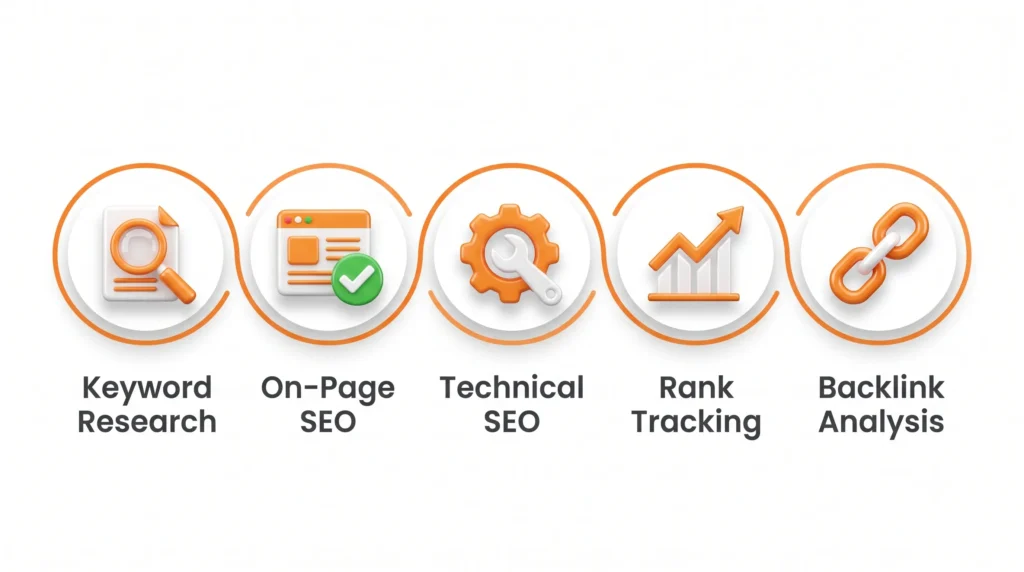
Every useful SEO toolkit, no matter your budget, covers five jobs. Let’s break each one down before naming specific tools.
1. Keyword Research Tools
These show you what people are typing into search engines, how often, and how competitive that phrase is. This is where every piece of content should start.
2. On-Page SEO Tools
These check whether a specific page (title tag, headings, images, content) is set up correctly for both readers and search engines. If you haven’t already, this pairs perfectly with our guide to on-page SEO basics.
3. Technical SEO Tools
These scan your entire website for things a human wouldn’t easily spot — broken links, slow-loading pages, missing alt text, duplicate pages, and crawl errors.
4. Rank Tracking Tools
These tell you where your website currently sits in search results for your target keywords, so you can measure whether your efforts are working.
5. Backlink & Competitor Analysis Tools
These show you which other websites link to you (and your competitors), which is one of the strongest ranking signals in SEO.
If any of these categories feel unfamiliar, our SEO foundations guide for beginners breaks each concept down in plain, non-technical language.
Best Free SEO Tools for Beginners
Here’s the good news: you can build a fully functional starter toolkit for $0. Let’s go category by category.
Keyword Research (Free)
Google Keyword Planner – originally built for advertisers- is still one of the most reliable free ways to see search volume and keyword ideas. Free with a Google Ads account (no ad spend required to browse data).
Google Search Console – shows you the exact phrases people are already typing to find your site, even ones you didn’t target on purpose. This is often the most underrated free tool a beginner can use.
AnswerThePublic (free tier) – Turns a single keyword into dozens of real questions people ask, which is perfect for planning blog topics and FAQ sections.
On-Page SEO (Free)
Yoast SEO or Rank Math (WordPress plugins). These give you a real-time checklist while writing, flagging things like missing meta descriptions, short content, or missing keywords in headings.
Google PageSpeed Insights tells you exactly how fast your page loads on mobile and desktop, plus specific fixes.
Technical SEO (Free)
Google Search Console (again) doubles as a technical health tool, showing crawl errors, mobile usability issues, and indexing problems.
Screaming Frog SEO Spider (free version) crawls up to 500 URLs for free, showing broken links, missing titles, and duplicate content, genuinely used by professionals, not just beginners.
Rank Tracking (Free)
Google Search Console shows your average position for keywords you’re already ranking for, updated daily.
Backlink Analysis (Free, Limited)
Ahrefs Free Backlink Checker gives a snapshot of your top backlinks without needing a paid account — enough to get oriented early on.
Comparison Table: Free SEO Tools at a Glance
| Tool | Category | Best For | Learning Curve |
|---|---|---|---|
| Google Keyword Planner | Keyword Research | Search volume & ideas | Easy |
| Google Search Console | Technical + Ranking | Site health & real search data | Easy |
| AnswerThePublic | Keyword Research | Content & FAQ ideas | Very Easy |
| Yoast / Rank Math | On-Page SEO | Real-time content checks | Very Easy |
| PageSpeed Insights | Technical SEO | Site speed diagnosis | Easy |
| Screaming Frog (Free) | Technical SEO | Site-wide audits | Medium |
| Ahrefs Backlink Checker | Backlink Analysis | Competitor link snapshots | Easy |
Best Paid SEO Tools for Beginners (When You’re Ready to Upgrade)
Free tools will genuinely take you far. But once your website starts growing, more pages, more traffic, and more competitors- a paid tool can save you hours every week by pulling everything into one dashboard.
Here are the most beginner-friendly paid options, all offering trials so you can test before committing.
Semrush — around $139.95/month for the entry plan, though heavily discounted trials are common. Covers keyword research, on-page checks, technical audits, and competitor analysis in one place. Considered one of the most complete “all-in-one” tools.
Ahrefs — starting around $129/month. Especially strong for backlink analysis and competitor research, with a genuinely simple interface for beginners.
SE Ranking — starting around $65/month, one of the more affordable full-suite options for small budgets, ideal for freelancers and solo business owners.
Surfer SEO — around $99/month. Focused purely on content optimization, comparing your draft against top-ranking pages and giving you a content “score.”
Comparison Table: Paid SEO Tools
| Tool | Starting Price (USD/month) | Best For | Beginner-Friendly? |
|---|---|---|---|
| Semrush | ~$139.95 | All-in-one SEO suite | Yes |
| Ahrefs | ~$129 | Backlinks & competitor research | Yes |
| SE Ranking | ~$65 | Budget-friendly full suite | Yes |
| Surfer SEO | ~$99 | Content optimization | Yes |
Note: Prices change often; always check the official pricing page before purchasing.
Step-by-Step: How to Build Your First SEO Toolkit
Let’s turn this into an action plan instead of just a list.
Step 1: Start with Google Search Console. It’s free, it’s official, and it tells you exactly how Google already sees your site. Set it up before anything else.
Step 2: Add a keyword research habit. Use Google Keyword Planner or AnswerThePublic once a week to build a running list of topics your audience actually cares about.
Step 3: Install an on-page SEO plugin. If your site runs on WordPress, Yoast or Rank Math will guide you page by page while you write.
Step 4: Run one technical audit per month. Use the free version of Screaming Frog or PageSpeed Insights to catch broken links or slow pages before they hurt you.
Step 5: Check your backlinks quarterly. Even the free Ahrefs checker will show you who’s linking to you, and who’s linking to your competitors instead.
Step 6: Upgrade only when free tools start limiting you. If you’re hitting the crawl limit on Screaming Frog or you need deeper competitor data, that’s your signal to consider a paid plan, not before.
This approach mirrors the same steady, learn-first mindset covered in our complete blogging for beginners guide, where consistency always beats rushing to buy every tool at once.
Common Mistakes Beginners Make With SEO Tools
Mistake 1: Buying a paid tool before understanding the basics. A $130/month tool won’t help if you don’t yet understand what a keyword or a backlink actually is. Learn the fundamentals first; our types of SEO guide is a great next stop.
Mistake 2: Collecting data but never acting on it. A tool showing you 40 keyword ideas is useless if you never write content around them. Data without action changes nothing.
Mistake 3: Chasing every metric at once. You don’t need to fix everything today. Pick one category, usually keyword research, and get comfortable before layering on more tools.
Mistake 4: Ignoring Google Search Console because it “looks confusing.” It’s actually the simplest, most direct source of truth about your site. Spend 20 minutes learning its main tabs, and it stops feeling intimidating.
Mistake 5: Confusing SEO tools with SEO strategy. Tools show you information. They don’t replace understanding why SEO matters in the first place, or how it compares to other channels like paid ads or social media, something we unpack fully in SEO vs PPC vs SMM.
Beginner SEO Toolkit Checklist
Use this before you consider your toolkit “complete”:
- Google Search Console set up and verified
- One keyword research tool is bookmarked and used weekly
- On-page SEO plugin installed (if using WordPress)
- Page speed checked in the last 30 days
- One technical site crawl completed in the last 30 days
- Backlink profile checked in the last 90 days
- A running content/topic list based on real keyword data
- A clear decision point for when you’ll upgrade to paid tools
FAQs About SEO Tools for Beginners
What are the best SEO tools for beginners? Google Search Console, Google Keyword Planner, and a plugin like Yoast or Rank Math cover the core basics without costing anything, making them the best starting point for beginners.
Which SEO tool is free? Google Search Console, Google Keyword Planner, AnswerThePublic (limited), PageSpeed Insights, and the free version of Screaming Frog are all genuinely free to use.
Do beginners need paid SEO tools? Not right away. Free tools can comfortably support a small website or blog for months. Paid tools become useful once you’re managing more pages, more competitors, or needing deeper data.
What SEO tools should I learn first? Start with Google Search Console and a basic keyword research tool. These two alone will teach you more about your website than any paid tool in your first month.
What is the best keyword research tool for someone with zero experience? Google Keyword Planner is the easiest starting point because it’s free, official, and doesn’t require any technical setup.
Which SEO tool is easiest to use for a total beginner? Yoast or Rank Math, since both give plain-language suggestions directly inside your content editor as you write.
Can I do SEO without paid tools? Yes. Many small business owners run effective SEO for a year or more using only free tools before ever paying for software.
Final Thoughts
My friend with the candle shop didn’t need to become an SEO expert overnight. She just needed a flashlight, a few simple, free tools that showed her what was actually happening on her website and in her customers’ searches.
Once she started using Google Search Console and a basic keyword tool, she stopped guessing. She began writing about what people were actually searching for, fixed a few slow-loading pages, and within a couple of months, her shop started showing up where it mattered.
You don’t need every tool on this list. You need one keyword tool, one on-page checklist, and the patience to check your data regularly. Everything else can wait until you actually outgrow it.