What Happens in the 0.5 Seconds After You Search on Google?
Imagine you’re sitting in a Chennai café, phone in hand. You type “best SEO tools for beginners” into Google and hit search. In less than half a second, Google shows you millions of results — ranked in order, most useful first.
How does Google do that so fast?
It didn’t search the entire internet just now. It had already done the hard work long before you typed that query.
That’s what this guide is about — the three things that happen behind the scenes before a single result shows up on your screen. Once you understand this, you’ll know exactly why your website is or isn’t showing up on Google — and what to do about it.
The Three Stages Every Search Goes Through
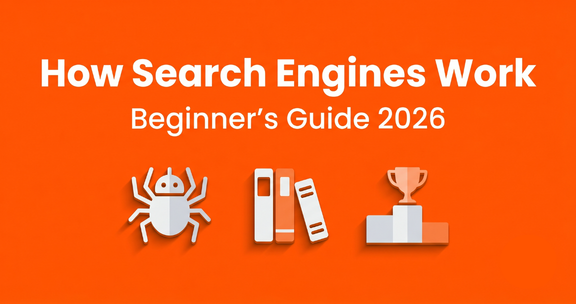
Every time Google shows you results, three things have already happened:
- Crawling — Google found the page
- Indexing — Google stored and understood the page
- Ranking — Google decided where to show it
These three stages are the engine that powers every Google search. Let’s break each one down.

Stage 1 — Crawling: How Google Finds Your Website
What Is Googlebot?
Google uses a program called Googlebot — sometimes called a “spider” or “crawler” — to browse the internet. Think of it like a robot that visits websites, reads the content, and follows every link it finds.
Googlebot doesn’t sleep. It’s constantly crawling billions of web pages around the world, 24 hours a day.
How Does Googlebot Discover New Pages?
Googlebot finds new pages in two main ways:
- Following links — When another website links to your page, Googlebot follows that link and lands on your site
- Sitemaps — You can submit a sitemap (a list of all your pages) directly to Google via Google Search Console
This is why backlinks matter so much in SEO. They’re not just for traffic — they’re one of the main ways Google discovers your content in the first place.
What Can Stop Google From Crawling Your Site?
A few things can block Googlebot from visiting your pages:
- A robots.txt file that says “do not crawl this page.”
- A noindex tag in your page’s HTML code
- A website that’s not publicly accessible
- Pages with no links pointing to them (these are called “orphan pages”)
If your new blog post isn’t showing on Google after a week, crawling might be the issue. We’ll come back to how to fix this shortly.
Stage 2 — Indexing: How Google Stores Your Content
What Is the Google Index?
After Googlebot crawls a page, it sends that page’s content back to Google’s servers. Google then reads, analyses, and stores this content in a giant database called the Google Index.
Think of the Google Index like the back catalogue of a massive library. Every book (webpage) the librarian (Googlebot) has collected is filed away and organised here.
How Does Google Understand What Your Page Is About?
Google’s algorithm reads your page the same way a very smart reader would. It looks at:
- Your page title and headings (H1, H2, H3 tags)
- The keywords used throughout your content
- Your images and their alt text
- How your page is structured and linked
- The overall topic of your website
This is why on-page SEO matters. When you structure your content correctly — clear headings, relevant keywords, descriptive alt text — you’re making it easy for Google to understand what your page is about.
What Is robots.txt and Why Does It Matter?
robots.txt is a simple text file that lives on your website. It tells search engine crawlers which pages they’re allowed to visit and which they should skip.
For most beginner bloggers, you don’t need to worry about this too much — WordPress handles it correctly by default. But if your site was set to “private” during setup and you forgot to switch it to public, robots.txt could be blocking Google entirely.
How to Check If Your Page Is Indexed
This is the easiest check you can do. Open Google and type:
site:yourwebsite.com
For example: site:marketingwitharavind.wordpress.com
If your pages appear in the results, they’re indexed. If nothing shows up — they’re not.
You can also use Google Search Console to check the indexing status per URL. We’ll cover that in detail in our Google Search Console guide for beginners.
Stage 3 — Ranking: How Google Decides Who Ranks First
What Are Google’s Ranking Factors?
Once your page is indexed, Google needs to decide: where should this page appear when someone searches for a related topic?
Google uses over 200 ranking factors in its algorithm. But for beginners, these are the most important ones to know:
| Ranking Factor | What It Means |
| Content relevance | Does your page actually answer the search query? |
| Content quality | Is it detailed, accurate, and helpful? |
| Backlinks | How many trusted sites link to your page? |
| Page speed | Does your page load fast? |
| Mobile-friendliness | Does it work well on mobile? |
| Search intent match | Does your content match what the user actually wanted? |
| User experience | Do people stay and read, or leave immediately? |
You don’t need to master all of these on day one. Start with the top three: relevance, quality, and search intent.
How Does Search Intent Affect Rankings?
Search intent means: what is the person actually trying to do when they type that query?
For example, if someone searches “how do search engines work,” they want to learn something. They’re not looking to buy a product or find a local business. This is called informational intent.
Google is very good at detecting intent. If your page’s content matches what the searcher actually wants, you have a much higher chance of ranking — even if your website is new.
Why Do Some Websites Always Rank at the Top?
You’ve probably noticed that big websites like HubSpot, Moz, and Neil Patel tend to rank for almost everything SEO-related. This is because of page authority and domain authority — a measure of how much Google trusts a website based on its age, backlinks, and content history.
As a new blogger, you’re not going to beat HubSpot on a head-to-head keyword. But you can rank for long-tail keywords — more specific, lower-competition searches that bigger sites don’t always target. That’s exactly the SEO foundations strategy we cover in our full SEO foundations for beginners guide.
The Library Analogy — The Simplest Way to Understand All Three Stages

Still feeling a little confused? Here’s the analogy that makes everything click.
Imagine Google is the world’s biggest library.
- Crawling = The librarian walks through the entire city collecting every book, magazine, and pamphlet they can find
- Indexing = The librarian reads each book, understands what it’s about, and files it in the right section of the library
- Ranking = When you walk in and ask, “What’s the best book about SEO for beginners?” — the librarian picks the most relevant, most reliable, most readable book from the shelf and hands it to you first
Your job as a blogger? Write a book so good that the librarian can’t help but recommend it first.
What Is a SERP? (And Why It Matters for You)
SERP stands for Search Engine Results Page — it’s the page you see after you hit search on Google.
Organic Results vs Paid Results
Not all results are equal. There are two types:
- Paid results — Ads that businesses pay for. They appear at the top and bottom and are labelled “Sponsored”
- Organic results — Free results that rank because Google considers them the most relevant. This is what SEO helps you achieve
As a beginner blogger focused on building long-term traffic, your goal is organic results.
Featured Snippets — The #0 Position
At the very top of some search results, you’ll see a special box with a direct answer — that’s called a featured snippet. It’s sometimes called “position zero” because it appears above all other organic results.
Featured snippets are often in the form of numbered lists, definitions, or step-by-step explanations. Writing structured content with clear headings and concise answers gives you a real chance of winning one — even as a beginner.
Why Is My Website Not Showing on Google?
This is one of the most common questions from new bloggers. Here are the most likely reasons:
Common Reasons Your Site Isn’t Indexed
- Your site is set to private (check your WordPress settings)
- Google hasn’t crawled your site yet — it can take 1–4 weeks for a brand new website
- You haven’t submitted a sitemap in Google Search Console
- Your page has a noindex tag accidentally added
- No other website links to you yet, so Googlebot hasn’t found you
The fastest fix? Submit your URL directly using the URL Inspection Tool in Google Search Console. After every new blog post you publish, use GSC to request indexing — don’t wait.
How Long Does Google Take to Index a New Page?
For a brand new website with no authority yet, it typically takes:
- Established websites: A few hours to a couple of days
- New websites: 1 to 4 weeks (sometimes longer)
You can speed this up by:
- Submitting your URL in Google Search Console
- Getting a backlink from a high-authority site (like Medium or LinkedIn)
- Adding internal links from your already-indexed pages to the new post
This is one reason why publishing your blog links on Medium — a trusted, high-authority platform — actually helps your WordPress blog get indexed faster.
How to Help Google Find and Rank Your Website Faster
Submit a Sitemap in Google Search Console
A sitemap is a file that lists every page on your website. When you submit it to Google Search Console, you’re essentially handing Googlebot a complete map of your site and saying “please visit all of these.”
On marketingwitharavind.com/, your sitemap URL is usually: yoursite.wordpress.com/sitemap.xml
Go to GSC → Sitemaps → Enter your sitemap URL → Submit.
Use Internal Links Strategically
Every time you publish a new post, go back to your older published posts and add a link to the new one. This helps Googlebot discover your new content faster, because it follows links from pages it already knows.
It also helps your readers find related content — which is good for both SEO and user experience. For more on this, check out our complete guide to digital marketing basics for beginners.
Write Content Around Search Intent
Before you write any post, ask yourself: what does the person searching this keyword actually want? Then write your content to answer that question better than anyone else.
Google’s job is to match search queries with the most helpful, relevant content. Your job is to create that content.
Crawling, Indexing, and Ranking — Quick Recap Table
| Stage | What It Means | Your Action |
| Crawling | Google finds your page | Submit sitemap, build backlinks, use internal links |
| Indexing | Google stores and understands your page | Clear headings, keywords, descriptive alt text |
| Ranking | Google decides your position | Match search intent, quality content, earn backlinks |
Beginner Checklist — Is Your Website Search Engine Ready?
Before you worry about ranking, make sure you’ve covered the basics:
- ☐ WordPress site is set to public (not private)
- ☐ Google Search Console is connected and verified
- ☐ Sitemap is submitted in GSC
- ☐ Every blog post has a clear H1 heading
- ☐ Every post has a keyword-rich title and meta description
- ☐ Images have descriptive alt text
- ☐ New posts are submitted for indexing via the URL Inspection Tool
- ☐ Internal links connect your posts to each other
- ☐ No pages accidentally set to noindex

FAQs — How Search Engines Work
What is a search engine in simple terms? A search engine is a tool that searches a stored database of web pages and shows you the most relevant results for your query. Google, Bing, DuckDuckGo, and Yahoo are all search engines. Google is by far the most used globally.
What is crawling in SEO? Crawling is when Google’s bot (called Googlebot) visits web pages across the internet, reads their content, and follows the links on those pages to discover new ones. Think of it as Google collecting books before storing them in its library.
What is indexing in SEO? Indexing is when Google takes the pages it has crawled, analyses them, and stores them in its giant database (the Google Index). Only indexed pages can appear in search results.
What is ranking in SEO? Ranking is how Google decides which indexed pages should appear for a given search query — and in what order. Pages are ranked based on relevance, quality, backlinks, speed, and many other factors.
How do I know if my website is indexed by Google? Type site:yourwebsite.com in Google’s search bar. If your pages appear, they’re indexed. You can also check individual pages using the URL Inspection Tool in Google Search Console.
How long does it take for Google to index a new blog post? For new websites it can take anywhere from 1 to 4 weeks. You can speed this up by submitting the URL directly in Google Search Console and building internal links from your already-indexed pages.
Why is my website not appearing on Google? The most common reasons are: your WordPress site is set to private, Google hasn’t crawled it yet, you haven’t submitted a sitemap, or there are no links (internal or external) pointing to your new page. Check these first before assuming a larger problem.