Sarah ran a small home bakery. She made incredible cakes. But nobody outside her neighborhood knew she existed.
One day, a friend told her to “start a blog.” She laughed it off. Who has time to write? Who would even read it?
Six months later, a customer messaged her saying, “I found your lemon drizzle cake recipe on Google. Can I order 50 for a corporate event?” That was a $600 order, from a blog post she almost never wrote.
That’s the power of blogging.
And here’s the thing, you don’t need to be a professional writer. You don’t need a tech degree. You just need a beginner’s guide that walks you through every step. That’s exactly what this is.
This is your complete beginner’s guide to blogging in 2026, from choosing a niche to writing your first post to getting your blog found on Google. And if you want to understand why blogging works so well, it all connects back to the foundations of content marketing for beginners, so make sure you read that too.
Let’s get started.
1. What Is Blogging — And Why Should You Start One?
A blog is a page on a website where you regularly publish written content, also called blog posts or articles.
These posts can teach something, answer a question, share a story, review a product, or guide someone through a process. You write it once. It lives on the internet forever. And every single day, new people can find it through Google.
That’s the magic of blogging. It’s the only piece of content that works while you sleep.
Blogging vs Social Media: What’s the Difference?
This is a question almost every beginner asks.
Here’s a simple way to think about it:
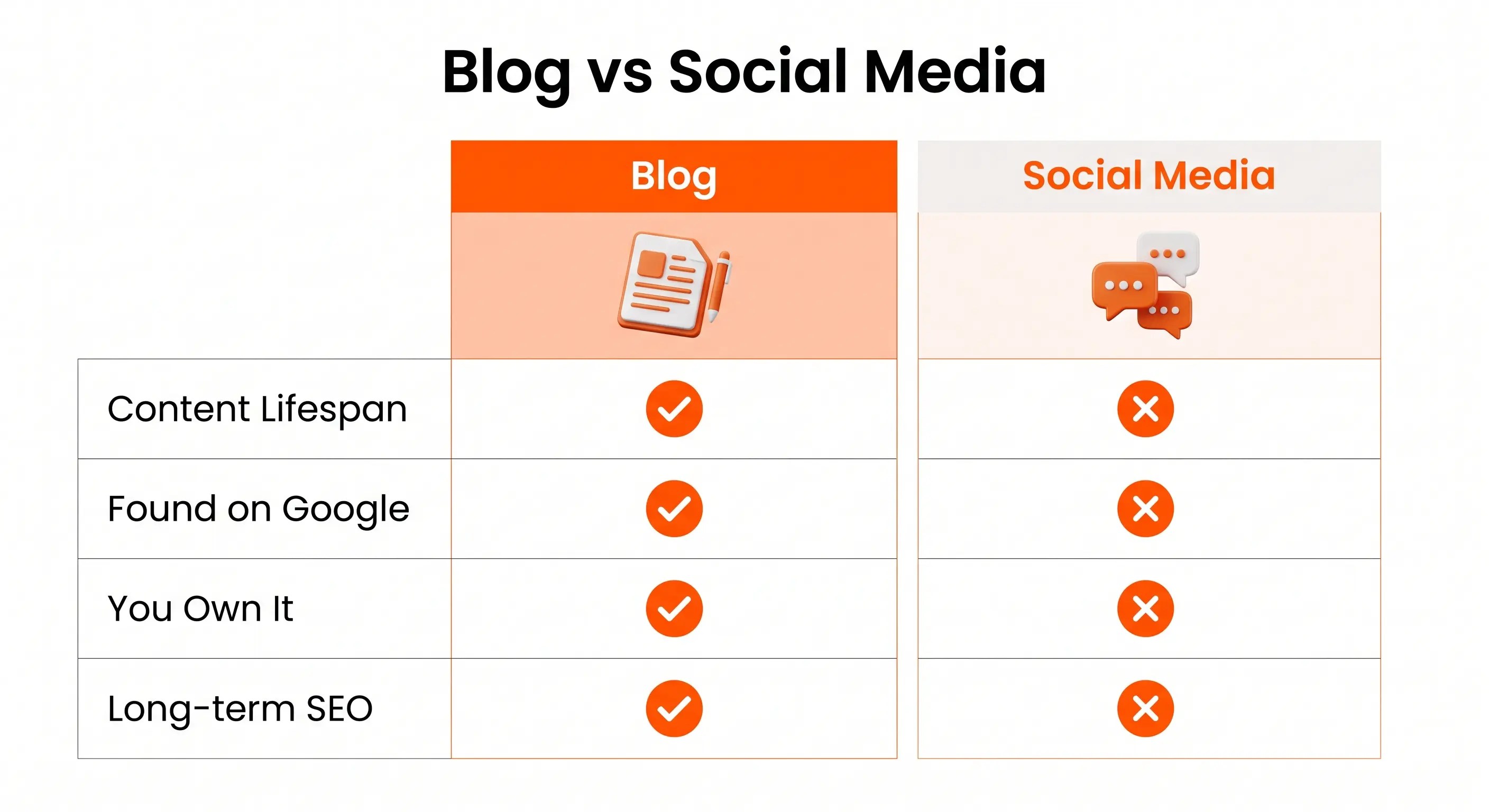
| Feature | Blog | Social Media |
| Content lifespan | Years | Hours or days |
| Gets found on Google | ✅ Yes | ❌ Rarely |
| You own it fully | ✅ Yes | ❌ Platform owns it |
| Best for | Traffic and trust | Engagement and visibility |
| Builds long-term SEO | ✅ Yes | ❌ No |
Social media gets you seen today. Your blog gets you found for years.
Smart marketers use both together, social media to promote, and the blog to convert and rank.
2. Why Blogging Is Still One of the Best Content Marketing Channels in 2026
Some people say “blogging is dead.” Those people have never checked their website analytics.
Businesses that blog consistently get significantly more website traffic than those that don’t. And that traffic is free. No paid ads. No boosting posts. Just content that ranks on Google and brings people to your website every single day.
Blogging is one of the most powerful tools inside your content marketing strategy, and it’s a channel where a complete beginner can genuinely compete.
What Can a Blog Do for Your Business or Brand?
Here’s what a good blog does for you:
- Drives organic traffic from Google to your website
- Builds trust and authority in your niche
- Generates leads — readers become email subscribers or customers
- Supports your social media — every post is a week of social content
- Creates income streams — ads, affiliate links, and digital products all need content
Whether you’re a freelancer, a small business owner, or someone building a personal brand, blogging gives you a platform you fully own and control.
3. Step 1 — Choose Your Blog Niche
Before you write a single word, you need to decide what your blog is about.
This is called your blog niche, the specific topic or audience your blog serves.
Getting this right will save you months of frustration later.
How to Pick a Niche You Won’t Quit After 3 Months
Most beginner bloggers pick a topic they think will make money, then quit after 3 months because they run out of ideas or motivation.
The smarter way is to pick a niche that hits all three of these:
- You know something about it (even if you’re a beginner, “learning in public” works great)
- People are searching for it (there’s demand, not just your friends)
- There’s a way to make money (products, services, ads, or affiliates in that space)
Some examples of niches that work well for beginners:
- Personal finance for recent graduates
- Home cooking for beginners
- Digital marketing basics (sound familiar?)
- Remote work and productivity tips
- Small business marketing
What Makes a Good Blog Niche?
A good blog niche is specific but not tiny.
“Marketing” is too broad. “Instagram marketing for dentists” is too narrow. “Digital marketing for beginners”, that’s the sweet spot. Wide enough to have lots of topics. Specific enough to attract the right audience.
4. Step 2 — Choose Your Blogging Platform
Once you have your niche, you need a place to build your blog.
This is called your blogging platform; think of it as your blog’s home address.
WordPress vs Other Platforms: Which One Should You Use?
There are many options out there. Here’s a quick breakdown:
| Platform | Best For | Cost | SEO Friendly |
| WordPress.org | Full control, serious bloggers | Hosting cost (~$3–10/mo) | ✅ Excellent |
| marketingwitharavind.com/ | Beginners with no budget | Free / Premium plans | ✅ Good |
| Blogger | Absolute beginners | Free | ⚠️ Limited |
| Wix | Non-tech users | Free / Paid plans | ✅ Good |
| Medium | Writers (not full blogs) | Free | ⚠️ Limited control |
Recommendation for most beginners: Start with WordPress, either marketingwitharavind.com/ (free plan) to learn the basics, or WordPress.org with Hostinger or GoDaddy hosting if you’re serious about growth.
WordPress powers over 40% of all websites on the internet. The skills you learn here transfer everywhere.
Free vs Paid Plans — What’s the Real Difference?
On marketingwitharavind.com/’s free plan:
- You can write and publish posts ✅
- Your URL will look like: yourblog.wordpress.com
- You can’t install plugins like Yoast SEO
- Limited storage and customization
On a paid or self-hosted plan:
- Custom domain (yourblog.com) ✅
- Full plugin access (Yoast SEO, Rank Math, Google Analytics) ✅
- More themes and customization ✅
- Better SEO potential ✅
If you’re starting with zero budget, the free plan works. But plan to move to a paid option within 6–12 months.
5. Step 3 — Set Up Your Blog the Right Way
Now it’s time to actually build your blog.
This doesn’t need to be perfect. It needs to be functional and fast.
Choosing a Domain Name
Your domain name is your blog’s address on the internet.
Good domain name rules:
- Keep it short (2–4 words max)
- Use your name, brand, or niche keyword
- Avoid hyphens and numbers
- Go for .com if possible
Examples of strong domain names:
- marketingwitharavind.com ✅
- thebeginnerblogger.com ✅
- learnsocialmedia.com ✅
Setting Up Basic Pages Every Blog Needs
Before you publish your first post, create these four pages:
- Home page — Your blog’s welcome page with a brief intro
- About page — Who you are and what your blog is about (builds trust)
- Blog page — Where all your posts live
- Contact page — How readers can reach you
These four pages make your blog look professional and credible from day one.
6. Step 4 — Do Keyword Research Before You Write
Here’s what separates blogs that get traffic from blogs that don’t:
Keyword research.
Most beginners skip this step and just write whatever feels interesting. Then they wonder why no one visits their blog.
The problem isn’t the writing. It’s that nobody was searching for what they wrote.
What Is a Blog Keyword and Why Does It Matter?
A keyword is the exact phrase people type into Google when they’re looking for something.
When you write a blog post around a specific keyword, Google can understand what your post is about and show it to people searching for that exact thing.
Without keyword research, you’re writing into the void.
With keyword research, you’re writing answers to questions people are already asking.
This is closely connected to how search engines work, once you understand that, keyword research makes total sense.
How to Find Keywords as a Complete Beginner
You don’t need paid tools to get started. Try these free methods:
1. Google Autocomplete: Type your topic into Google. See what Google suggests. Those suggestions are real searches real people make.
2. People Also Ask box: Google shows this on almost every search result page. These are questions your audience is actually asking, perfect for blog topics.
3. Google Keyword Planner: Free tool inside Google Ads. Shows you search volumes and keyword ideas.
4. Answer the Public: Free tool at answerthepublic.com. Shows question-based keywords around any topic.
What to look for:
- Keywords with search volume (people are looking)
- Keywords your site can realistically rank for (not dominated by huge brands)
- Keywords that match what you actually know
7. Step 5 — Write Your First Blog Post (The Right Way)
Now the part everyone gets nervous about: actually writing.
Here’s the truth: your first blog post will not be perfect. That’s okay. Done is better than perfect. You learn by publishing.
The Simple Blog Post Structure That Actually Ranks
Every good blog post follows a predictable structure:
1. Title (H1) Your main keyword goes here. Keep it clear and benefit-focused. Example: “Blogging for Beginners: Complete Step-by-Step Guide (2026)”
2. Introduction Start with a story, a problem, or a surprising fact. Hook the reader in the first 3 sentences. Then tell them what they’ll get from reading this post.
3. Main Body (H2 sections) Break your content into clear sections with H2 headings. Each section answers one part of the topic. Use short paragraphs — 2–4 lines max. Add bullet points and tables to break up text.
4. Conclusion Summarize the main takeaways. Give one clear next step. Add a call to action, ask them to comment, share, or check out another post.
5. FAQ Section Answer 5–7 common questions people ask about your topic. These often rank in Google’s “People Also Ask” box.
How Long Should Your First Blog Post Be?
For beginner bloggers writing on medium-competition topics: 1,800–2,500 words is a strong target.
Longer posts (2,500–3,500 words) tend to rank better for competitive keywords. But quality matters more than length. A 1,500-word post that genuinely helps someone is worth more than a 4,000-word post packed with filler.
Start with what you know. Go deep on one topic. Publish it.
8. Step 6 — Optimize Every Post for SEO Before Publishing
Writing the post is only half the job. The other half is making sure Google can find it.
This is called on-page SEO, the process of optimizing each blog post so it ranks higher in search results.
If you want to go deep on this, read the full guide on on-page SEO basics. It covers everything in detail.
On-Page SEO Checklist for Beginner Bloggers
Before you publish any blog post, make sure you’ve done all of this:
- ✅ Primary keyword in your H1 title
- ✅ Primary keyword in your URL slug (keep it short)
- ✅ Primary keyword in your meta description
- ✅ Primary keyword in the first 100 words of your content
- ✅ Secondary keywords and variations used naturally in H2 headings
- ✅ Images uploaded with descriptive alt text
- ✅ At least 2 internal links to other posts on your blog
- ✅ At least 1 external link to a trusted authority source
- ✅ Post is easy to read on mobile
- ✅ Post loads quickly (compress your images)
Plugins like Yoast SEO or Rank Math make this checklist even easier on self-hosted WordPress. On a free marketingwitharavind.com/ plan, do all of this manually using the tips above.
What Is a Meta Description and How Do You Write One?
Your meta description is the short summary that appears under your blog title in Google search results.
It doesn’t directly affect your Google ranking, but it affects whether someone clicks on your result.
A good meta description:
- Is 140–155 characters long
- Includes your primary keyword naturally
- Tells the reader what they’ll get from the post
- Has a light call to action
Example: “New to blogging? Learn how to start a blog from scratch, write your first post, and grow traffic. A complete beginner’s guide to blogging in 2026.”
9. Step 7 — Publish and Promote Your Blog Post
Publishing is not the finish line. It’s the starting line.
Most beginner bloggers publish a post and wait for visitors to appear. They don’t. You need to bring people to your content, especially in the early months when your blog has no SEO authority yet.
Where to Share Your Blog Post After Publishing
LinkedIn — Write a short post sharing one key insight from your article. Put the blog link in the first comment (not in the post body, this reduces LinkedIn reach significantly).
Instagram — Create a carousel post or short reel summarizing the main points. Add your blog link in your bio and mention it in the caption.
Medium — Publish a shorter personal version of your blog post on Medium and link back to your full WordPress article. Medium is a high-authority site, and links from Medium help your WordPress blog get noticed.
Email list — If you’ve started building an email list, send a short email introducing your new post. Even a small list gets you immediate traffic.
Online communities — Share in relevant Facebook groups, Reddit communities, or LinkedIn groups, but add value to the conversation, don’t just drop a link.
10. Step 8 — Track Your Blog’s Performance
If you don’t measure results, you can’t improve.
Tracking helps you understand which posts are getting traffic, where your readers are coming from, and what’s working so you can do more of it.
What Tools Should You Use to Track Blog Traffic?
Google Search Console (GSC) — Free tool from Google. Shows which keywords your blog is ranking for, how many impressions your posts get, and how many clicks you receive. Connect this the moment your blog goes live.
Google Analytics — A free tool that shows total website visitors, which pages they visit, how long they stay, and where they came from. Add this as soon as possible.
marketingwitharavind.com/ Stats — If you’re on a free marketingwitharavind.com/ plan, you have basic built-in stats. Use these until you can connect to Google Analytics.
What to track every month:
- Total visits
- Which blog posts get the most traffic
- Which keywords are you ranking for
- Bounce rate (are people reading or leaving immediately?)
- Where your traffic is coming from (Google, social, direct)
Review your numbers monthly. Double down on what’s working. Improve what isn’t.
11. Blogging Mistakes Beginners Make (And How to Avoid Them)
Knowing what NOT to do can save you months of wasted effort.
Mistake 1: Writing without keyword research. You end up with posts nobody is searching for. Always research keywords first.
Mistake 2: Publishing inconsistently. One post a month rarely builds momentum. Aim for at least one quality post per week in your first 3 months.
Mistake 3: Ignoring SEO completely. Writing good content is necessary. But if it’s not optimized, Google won’t know it exists. Learn SEO basics from day one.
Mistake 4: Giving up too early. Most blogs take 6–12 months to gain real traction. This is a long game. Bloggers who quit after 2 months never find out what their blog could have become.
Mistake 5: No clear call to action. Every post should guide the reader somewhere: another post, your email list, or a product. Don’t let them hit the end of a post with nowhere to go.
Mistake 6: Copying competitors. Read other blogs for inspiration. But write in your own voice, from your own perspective. That’s what makes readers come back.
Mistake 7: Treating the blog like a diary. Your blog isn’t about you. It’s about your reader. Every post should answer one question: what does my reader need to know?
12. Blogging Checklist for Beginners: Before You Hit Publish
Use this before every single post you publish:
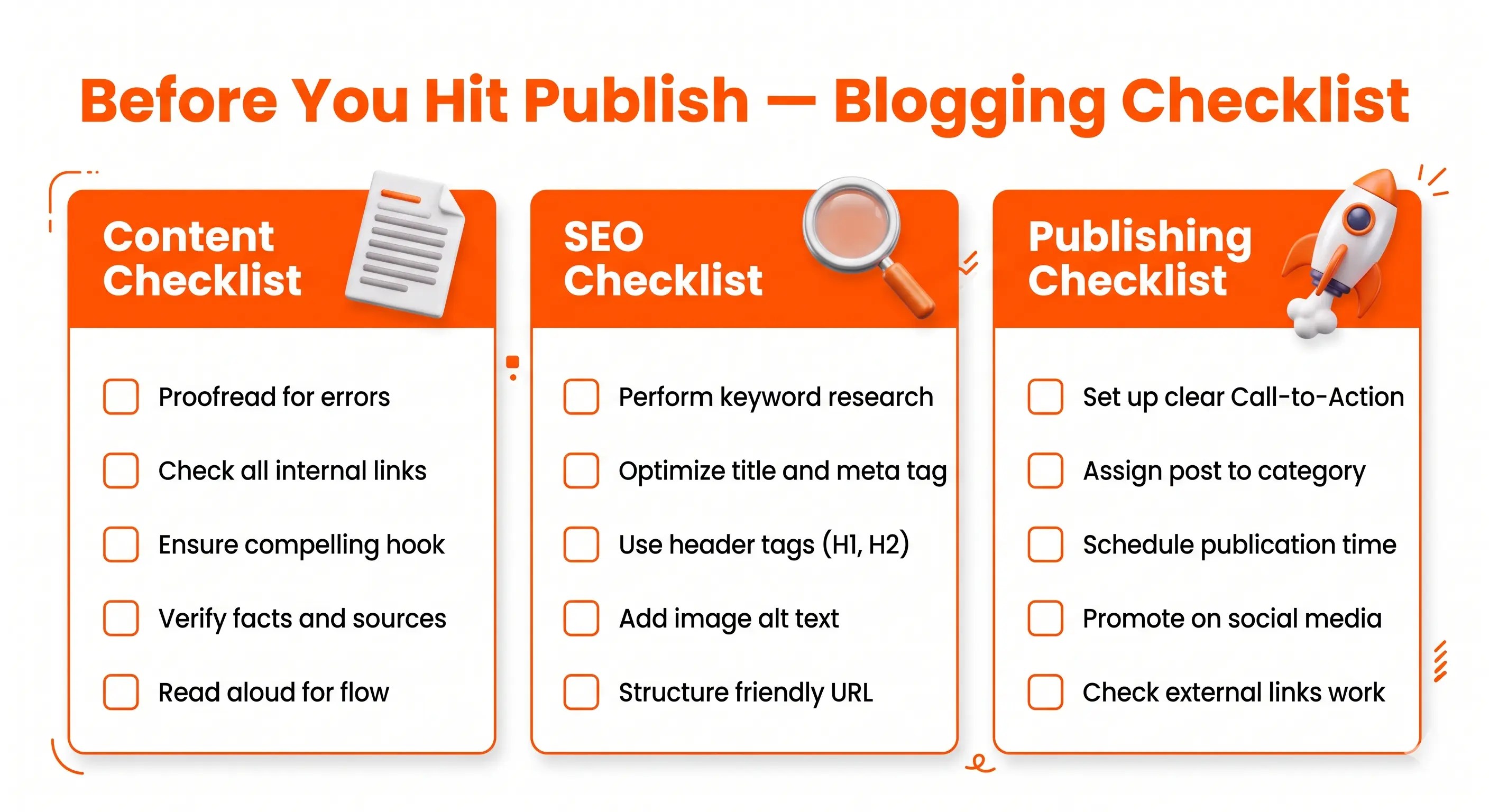
Content checklist:
- ✅ Post solves one specific problem for my reader
- ✅ Introduction starts with a story or relatable scenario
- ✅ Content is structured with H2 and H3 headings
- ✅ Paragraphs are 2–4 lines max
- ✅ At least one comparison table or checklist included
- ✅ FAQ section added at the end
- ✅ Conclusion has a clear call to action
SEO checklist:
- ✅ Primary keyword in H1 title
- ✅ Primary keyword in first 100 words
- ✅ Primary keyword in URL slug
- ✅ Meta description written (under 155 characters)
- ✅ 2–3 internal links with keyword anchor text
- ✅ 1 external link to a trusted source
- ✅ All images have alt text
Publishing checklist:
- ✅ Post assigned to correct category
- ✅ Featured image uploaded
- ✅ URL slug is clean and short
- ✅ Preview post on mobile before publishing
- ✅ Social media posts planned and ready
- ✅ Submit URL to Google Search Console after publishing
13. Frequently Asked Questions About Blogging for Beginners
How do beginners start blogging?
Start by choosing a niche you know something about. Then pick a platform (WordPress is the most popular). Do basic keyword research, write your first post, optimize it for SEO, and publish it. Consistency matters more than perfection.
What is blogging exactly?
Blogging is the practice of regularly publishing written articles or posts on a website. Each post is designed to inform, educate, or help a specific audience, and when optimized for SEO, those posts can be found by people searching on Google.
How do I write my first blog post?
Start with a keyword people are searching for. Write an introduction that hooks the reader. Break your content into clear H2 sections. Add a conclusion with a call to action. Keep paragraphs short. Aim for 1,500–2,500 words for your first post.
How often should I publish blog posts?
For beginner bloggers, aim for one high-quality post per week. Consistency beats frequency. A well-researched weekly post beats four rushed daily posts every time.
Can I start a blog for free?
Yes. marketingwitharavind.com/ offers a free plan. Blogger.com is also free. Medium lets you publish for free. The trade-off is limited customization and a subdomain URL (yourblog.wordpress.com instead of yourblog.com).
What platform is best for blogging?
WordPress is the most popular and flexible blogging platform in the world, used by over 40% of all websites. marketingwitharavind.com/ is great for beginners. WordPress.org (self-hosted) gives full control and is better for long-term growth.
How do blogs make money?
Blogs can earn through display advertising (Google AdSense), affiliate marketing (earning commissions when readers buy products you recommend), sponsored content, digital products (ebooks, courses, templates), or services. Most blogs need 6–12 months of consistent posting before earning meaningfully.
Is blogging still worth it in 2026?
Absolutely. Google processes billions of searches every day. Every search is a potential reader looking for exactly what your blog covers. Blogs that focus on SEO and serve a specific audience are still one of the most reliable ways to build organic traffic and grow an online brand.
Start Your Blog Today — One Step at a Time
Blogging isn’t complicated. But it does require patience, consistency, and a willingness to keep learning.
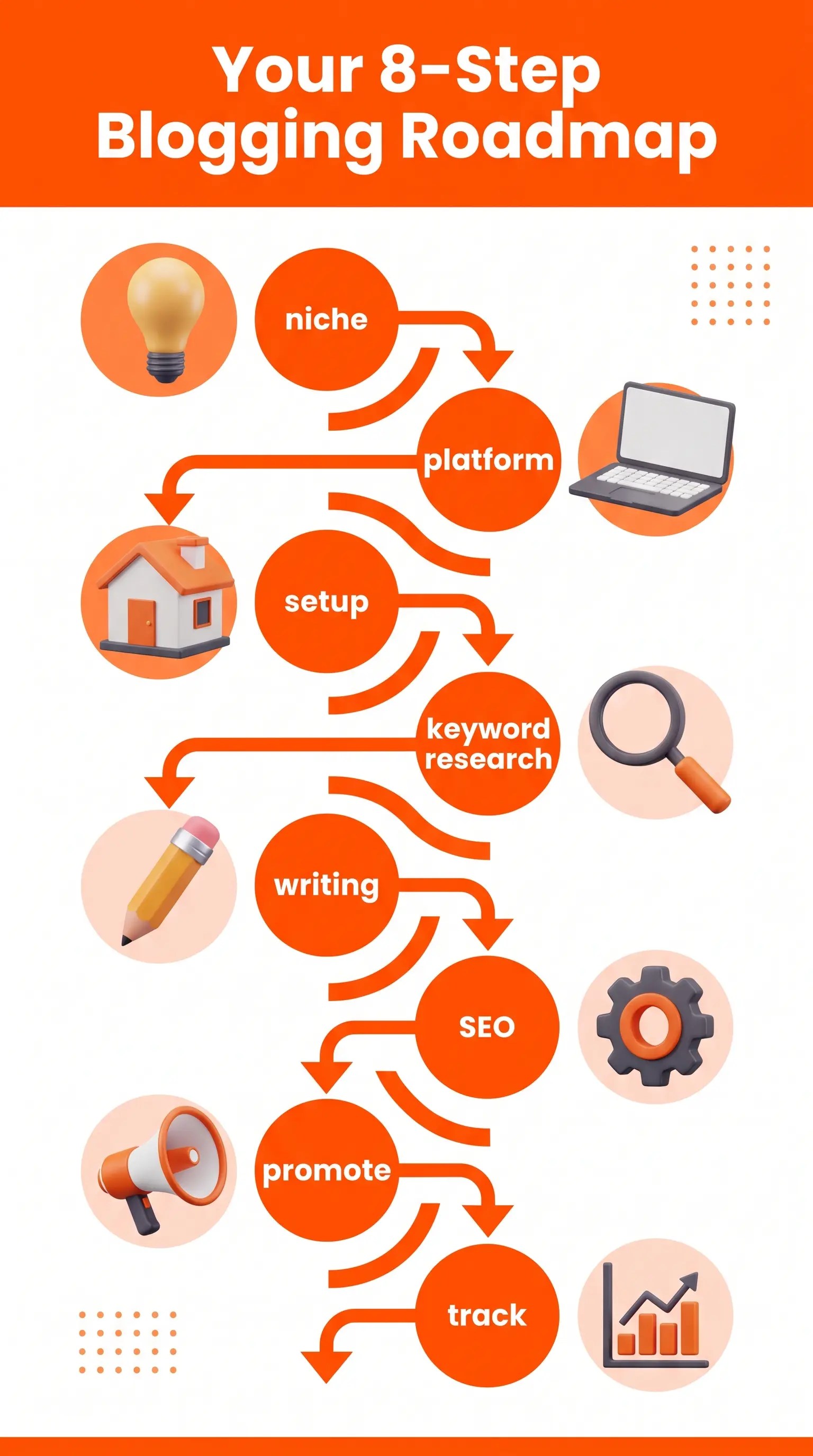
You’ve now got the complete roadmap:
- Choose your niche ✅
- Pick your platform ✅
- Set up your blog basics ✅
- Do keyword research ✅
- Write and optimize your posts ✅
- Promote and track results ✅
Start with step one. Don’t wait until everything is perfect. The best blog is the one that exists.