Introduction: How One Simple Reel Becomes Social Media Marketing
Let me tell you about something that happened recently.
A 22-year-old college student from Chennai posted a 30-second Instagram Reel. No fancy camera. No paid promotion. Just a simple tip about saving money on online shopping.
That reel got 2 million views in 48 hours. Her Instagram went from 200 followers to 80,000 overnight. Brands started reaching out. Her blog traffic exploded.
That right there? That’s social media marketing in action.
And here’s the truth nobody tells beginners — you don’t need a big brand, a huge budget, or years of experience to make social media work for you. You just need to understand how it works and show up consistently.
In this complete beginner’s guide to social media marketing, I’m going to walk you through everything — what it is, how it works, which platforms to use, and exactly how to build your strategy from scratch in 2026.
What Is Social Media Marketing?
Social media marketing is the process of using social media platforms to promote your brand, grow your audience, and drive traffic — organically or through paid ads.
But here’s the thing — in 2026, social media marketing isn’t just for big corporations with massive budgets. It’s for bloggers, students, creators, small businesses, and personal brands like yours.
Think about it:
- When you see a helpful Instagram carousel about digital marketing tips — that’s social media marketing
- When a LinkedIn post teaches you something useful and links to a blog — that’s social media marketing
- When a YouTube Short explains a concept in 60 seconds — that’s social media marketing
- When a brand replies to your comment and builds a conversation — that’s social media marketing
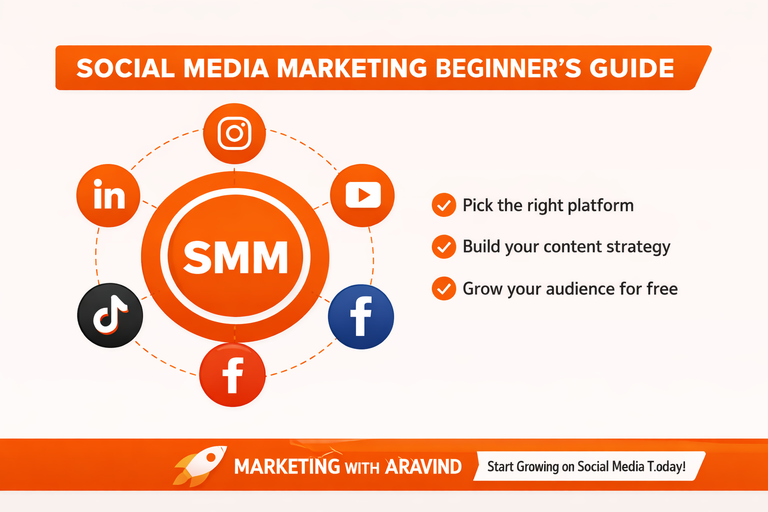
Simple definition: Social media marketing = using platforms like Instagram, LinkedIn, Facebook, YouTube, and TikTok to build your audience, share valuable content, and grow your brand — for free or with paid ads.
The key difference from traditional marketing? Social media is a two-way conversation. You don’t just broadcast — you engage, respond, and build a community.
Why Is Social Media Marketing Important in 2026?
Before we dive into the beginner social media marketing guide, let me show you why this skill matters more than ever.
Here’s the reality of social media in 2026:
- Over 5 billion people use social media worldwide
- The average person spends 2.5 hours on social media every single day
- 54% of people research products on social media before buying
- Organic reach on LinkedIn is higher than any other professional platform
- Instagram Reels and YouTube Shorts get massive free reach for new creators
- TikTok has made it possible for a brand new account to go viral with zero followers
For a digital marketing beginner like you — this is the biggest opportunity available. Your target audience is already on these platforms every single day. Social media marketing is how you reach them for FREE.
How Does Social Media Marketing Work?
Most beginners jump straight to posting without understanding the bigger picture. Let me explain how it actually works first — then everything else will make sense.
The Algorithm — Simply Explained
Every social media platform has an algorithm — a set of rules that decides which content gets shown to more people and which gets buried.
Here’s the simple version:
You post content → People engage with it (likes, comments, shares, saves) → The algorithm sees that people like it → The algorithm shows it to MORE people → Your reach grows
The opposite is also true — if people scroll past your content without engaging, the algorithm stops showing it.
This means content quality and engagement rate are everything. The algorithm doesn’t care about your follower count. It cares about how people respond to your content.
Beginner tip: Always ask before posting — “Would I stop scrolling to read this?” If the answer is no, rework it before posting.
The Social Media Marketing Cycle
Here’s how social media marketing works as a system:
Create valuable content → Post consistently → Build audience → Drive traffic to your blog/website → Convert visitors into subscribers or customers → Repeat
Every step feeds the next one. Your social media grows your blog. Your blog content feeds your social media. Together, they build your brand.
Which Social Media Platform Is Best for Beginners?
This is the most common question I get — and the honest answer is: it depends on your niche and audience. But let me break down each platform so you can make the right choice.

Instagram — Best for Visual Content
What it’s great for: Carousels, Reels, Stories, infographics, educational content
Why beginners love it: Instagram Reels currently get massive organic reach — even new accounts with zero followers can go viral with the right content.
Best content for your niche (digital marketing):
- Carousel posts: “5 SEO mistakes beginners make”
- Reels: “How to do keyword research in 60 seconds.”
- Stories: Quick polls, questions, behind the scenes
Posting frequency: 4–5 times per week for growth
LinkedIn — Best for Professional and Educational Content
What it’s great for: Blog promotion, thought leadership, educational posts, personal branding
Why it’s perfect for your niche: LinkedIn’s entire audience is professionals, marketers, entrepreneurs, and learners — exactly the people who want to learn digital marketing.
Best content for your niche:
- Text posts: “3 things I learned about SEO this week”
- Article sharing: Link to your blog posts with key insights
- Carousels: Step-by-step guides as slides
Posting frequency: 3–5 times per week
Facebook — Best for Community Building
What it’s great for: Groups, longer posts, community engagement, older demographics
Why it works: Facebook groups are goldmines for niche communities. Joining and contributing to digital marketing groups can drive significant traffic to your blog.
Best strategy for beginners: Don’t just create a page — join active groups in your niche and share value before promoting anything.
Posting frequency: 3–4 times per week
YouTube — Best for Long-Form Educational Content
What it’s great for: Tutorials, how-to videos, in-depth guides, evergreen content
Why it matters: YouTube is the world’s second largest search engine. A tutorial you upload today can get views for years — true evergreen content.
Best content for your niche:
- “How to set up Google Search Console — beginner tutorial”
- “SEO foundations explained in 10 minutes”
- “My content marketing workflow as a beginner blogger”
Posting frequency: 1–2 times per week (quality over quantity)
TikTok — Best for Short-Form Viral Content
What it’s great for: Quick tips, trending content, massive organic reach, young audience
Why beginners love it: TikTok’s algorithm is the most beginner-friendly of all platforms — a brand new account with zero followers can reach millions with the right video.
Best content for your niche:
- “One SEO tip that changed my traffic 📈”
- “Day in my life as a digital marketing blogger”
- “3 free tools every beginner marketer needs”
Posting frequency: 1–2 times per day for maximum growth
Which Platform Should YOU Start With?
As a digital marketing beginner blogger, here’s my recommendation:
Start with LinkedIn + Instagram.
- LinkedIn gives you professional credibility and great reach for educational content
- Instagram gives you visual content opportunities and a younger audience
- Both platforms perfectly complement a digital marketing blog
Master these two first. Add YouTube when you have 10+ blog posts and a clear content rhythm. Add TikTok when you’re ready for short-form video.
How to Create Your Social Media Strategy — Step by Step

Now here’s the practical part. This is your social media strategy for beginners — exactly what to do, in what order.
Step 1 — Define Your Target Audience
Before you post a single thing, you need to know WHO you’re posting for.
Your audience persona for this blog:
- Age: 18–30
- Interest: Learning digital marketing from scratch
- Pain point: Overwhelmed by complicated content
- Goal: Start a blog, grow online, build a personal brand
- Platforms they use: Instagram, LinkedIn, YouTube
Every piece of content you create should speak directly to this person.
Step 2 — Optimise Your Profiles
Your social media profile is your digital first impression. Before you post anything, make sure your profiles are fully set up.
For every platform, make sure you have:
✅ Clear profile photo — your logo or a professional headshot
✅ Keyword-rich bio — include “digital marketing” and “beginners” so people know what you’re about
✅ Website link — always link to your blog
✅ Consistent branding — same name, logo, and colors across all platforms
Your Instagram bio should look like this:
📈 Digital Marketing for Beginners
🔍 SEO | Content | Social Media | PPC
📖 New blog post every week
👇 Read the full guides
Check out this example ↓
Marketing with Aravind (@marketing.with.aravind) • Instagram photos and videos
Your LinkedIn headline should say:
Digital Marketing Blogger | Teaching SEO & Content Marketing to Beginners | marketingwitharavind.com
Step 3 — Build Your Content Strategy

A content strategy is your plan — what you’ll post, when you’ll post it, and on which platform.
For beginners, the simplest content strategy is the 3-2-1 formula:
- 3 educational posts — teach something valuable
- 2 engagement posts — ask questions, run polls, share opinions
- 1 promotional post — share your blog post or CTA
This gives you 6 pieces of content per week per platform — and keeps your feed balanced between giving value and promoting your work.
Step 4 — Create Your Content Calendar
A content calendar is simply a schedule of what you’ll post and when.
Here’s a simple weekly content calendar for LinkedIn + Instagram:
| Day | ||
| Monday | Educational tip post | Educational carousel |
| Tuesday | — | Reel — quick tip |
| Wednesday | Blog post promotion | — |
| Thursday | Personal story or opinion | Carousel or infographic |
| Friday | Quick tip or poll | Reel or story |
| Weekend | — | Story engagement |
Planning your content in advance means you never stare at a blank screen wondering what to post. Batch create your content on Sundays — then schedule it for the whole week.
Step 5 — Create Engaging Content
Here’s what makes content stop the scroll and drive user engagement on social media:
For Instagram Carousels:
- Slide 1: Bold hook — “5 SEO mistakes killing your traffic 🚫”
- Slides 2–6: One point per slide — short, punchy, visual
- Last slide: CTA — “Save this for later! Follow for more digital marketing tips”
For LinkedIn Posts:
- Open with a bold one-liner — no long intros
- Use short paragraphs — 1–2 lines max
- Add line breaks between every point
- End with a question to drive comments
- Put your link in the FIRST comment — not the post itself (LinkedIn reduces reach for posts with external links)
For Reels and Short Videos:
- Hook in the first 2 seconds — “Stop making this SEO mistake 🛑”
- Keep it under 30 seconds for maximum reach
- Add captions — 80% of people watch without sound
- Use trending audio when relevant
The golden rule of social media content:
Give 80% value. Promote 20% of the time.
Step 6 — Master Hashtags
Hashtags help your content get discovered by people who aren’t following you yet.
For Instagram:
- Use 5–10 targeted hashtags per post
- Mix big hashtags (#digitalmarketing — 50M posts) with niche ones (#seoforbeginners — 500K posts)
- Always include your branded hashtag: #MarketingWithAravind
For LinkedIn:
- Use 3–5 hashtags per post
- Keep them professional and relevant
- Example: #SEO #DigitalMarketing #ContentMarketing #BeginnerMarketing
Hashtag formula for beginners:
- 2 large hashtags (1M+ posts)
- 3 medium hashtags (100K–1M posts)
- 2 small niche hashtags (under 100K posts)
Step 7 — Engage With Your Community
Here’s the secret most beginners miss — social media is not a broadcast channel. It’s a conversation.
Community building means:
- Replying to every comment on your posts
- Commenting on posts from others in your niche
- Sharing other creators’ content with your own thoughts
- Joining conversations in your niche hashtags
- Responding to DMs genuinely
LinkedIn rewards engagement heavily — the more you comment on other posts, the more your own posts get shown to people. Spend 15–20 minutes every day engaging before and after posting.
Step 8 — Track Your Analytics
Social media analytics tell you what’s working and what’s not. Check these weekly:
On Instagram:
- Reach — how many unique accounts saw your post
- Engagement rate — likes + comments + saves ÷ reach × 100
- Profile visits — are people clicking to your profile?
- Link clicks — are people visiting your blog?
On LinkedIn:
- Impressions — how many times your post was seen
- Engagement rate — reactions + comments + shares ÷ impressions
- Follower growth — is your page growing?
- Post clicks — are people clicking your blog links?
What a good engagement rate looks like:
- Instagram: 3–6% is good, 6%+ is excellent
- LinkedIn: 2–4% is good, 4%+ is excellent
Use these numbers to understand what content your audience loves — then create more of it.
Practical Social Media Tools for Beginners (Free)
You don’t need expensive tools to start. Here’s your beginner toolkit:
| Tool | What It Does | Cost |
| Canva | Create carousels, banners, reels covers | Free |
| Buffer | Schedule posts in advance | Free (3 channels) |
| Hootsuite | Manage multiple platforms | Free (limited) |
| Meta Business Suite | Manage Instagram + Facebook | Free |
| LinkedIn Analytics | Track page performance | Free |
| Google Analytics | Track social traffic to the blog | Free |
| CapCut | Edit Reels and TikTok videos | Free |
The only tool you actually need to start: Canva. Everything else can wait.
Common Social Media Marketing Mistakes Beginners Make
❌ Being on every platform at once — pick 2 and master them. Spreading yourself thin means mediocre content everywhere.
❌ Posting without a strategy — random posting gets random results. Follow the 3-2-1 formula.
❌ Ignoring engagement — posting and disappearing is the #1 mistake. Reply to every comment, always.
❌ Only promoting your content — nobody follows a brand that only self-promotes. Give value first.
❌ Inconsistent posting — disappearing for weeks kills your algorithm reach. Consistency beats perfection.
❌ Copying other creators — your unique voice and perspective is your biggest advantage. Use it.
❌ Not linking to your blog — every social media post should have a path back to your website.
❌ Giving up too early — social media growth takes 3–6 months of consistent effort. Stay the course.
Social Media Marketing Checklist for Beginners
Before you post anything, run through this:
- [ ] Profile fully optimised on chosen platforms
- [ ] Content adds genuine value to my audience
- [ ] Visual is eye-catching and on-brand
- [ ] Caption has a strong hook in the first line
- [ ] Relevant hashtags added
- [ ] CTA included — what should the reader do next?
- [ ] Link to blog included (in bio or first comment)
- [ ] Posted at optimal time for my audience
- [ ] Replied to all comments within 1 hour of posting
Your 30-Day Social Media Action Plan
Here’s exactly what to do in your first 30 days:
Week 1 — Set Up
- Optimise all profiles completely
- Create 5 pieces of content in advance
- Post your first piece of content on both LinkedIn and Instagram
- Engage with 10 posts per day in your niche
Week 2 — Build Momentum
- Post consistently using the 3-2-1 formula
- Repurpose your first two blog posts into social content
- Start replying to every comment within 1 hour
- Join 3 relevant LinkedIn groups and 5 Instagram hashtag communities
Week 3 — Analyse and Improve
- Check your analytics — what performed best?
- Double down on your best-performing content type
- Try one new content format (carousel, reel, or video)
- Invite your personal connections to follow your page
Week 4 — Scale
- Batch create next month’s content
- Build your content calendar for month 2
- Engage with influencers in your niche
- Start cross-promoting — mention your Instagram on LinkedIn and vice versa
Final Thoughts: Show Up, Add Value, Stay Consistent
Here’s the most important thing I want you to take from this complete social media marketing guide for beginners:
Social media success is not about going viral. It’s not about having thousands of followers on day one. And it’s definitely not about posting the most.
It’s about showing up consistently, adding genuine value, and building real relationships with your audience over time.
The creators and brands winning on social media in 2026 aren’t the ones with the biggest budgets. They’re the ones who understood their audience, created helpful content consistently, and never gave up.
You’ve already started. You’ve got your blog. You’ve got your LinkedIn. You’ve got your content.
Now all you need is consistency.
Post. Engage. Learn. Improve. Repeat.
Your audience is out there waiting. Go find them.
Frequently Asked Questions
What is social media marketing for beginners?
Social media marketing for beginners is the process of using platforms like Instagram, LinkedIn, Facebook, and YouTube to grow your brand, share valuable content, and drive traffic to your website — without paid advertising.
Which social media platform is best for beginners?
For a digital marketing blogger, LinkedIn and Instagram are the best starting platforms. LinkedIn gives you professional reach and credibility, while Instagram offers massive organic reach through Reels and carousels.
How often should I post on social media?
For beginners, aim for 4–5 times per week on Instagram and 3–5 times per week on LinkedIn. Consistency matters more than frequency — it’s better to post 3 quality pieces per week than 7 mediocre ones.
Is social media marketing easy to learn?
Social media marketing is not hard to learn — but it requires consistency and patience. The basics can be understood in a few weeks. Seeing real growth typically takes 3–6 months of consistent posting and engagement.
How do beginners learn social media marketing?
The best way to learn social media marketing is to start posting, track your analytics, and learn from what works. Reading guides like this one, studying successful creators in your niche, and using free tools like Canva and Buffer will accelerate your learning significantly.
How to grow on social media organically?
To grow organically: post valuable content consistently, engage with your audience daily, use relevant hashtags, collaborate with others in your niche, and always reply to comments. Organic growth is slow but sustainable — and far more valuable than paid followers.
Found this guide helpful? Share it with a beginner who’s just starting their social media journey! Drop a comment below — which social media platform are you starting with first?